Time tracking you can trust
Delegent tracks time, captures screenshots, and measures activity openly, with your team's knowledge. Employees install it themselves and it never runs hidden, so everyone works from the same honest numbers.
 Screenshot takenDelegent · just now
Mouse moving with no keyboard input for 47 min. Worth a closer look.
Recommended actionsBuilt for trust with your remote team
Hiring remote talent means trusting people you never see in person. The desktop app closes that gap. It runs on your team’s own computer with their knowledge, records the hours they actually work, and shows the proof behind them.
Your team installs it
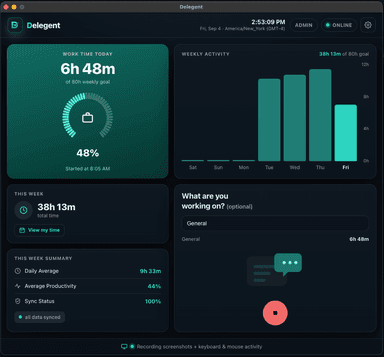
Each person installs the desktop app on their own computer and signs in themselves. Native on Mac (Apple Silicon and Intel) and Windows.
They press Start
It records only between Start and Stop, and pauses on its own when the computer sleeps, the lid closes or the screen locks.
You see the proof
Screenshots and activity stand behind the numbers, so you pay for real work and your team gets the credit they earned.
See it in action
Real product screens, shown with sample data: the same views your team and your clients will use.
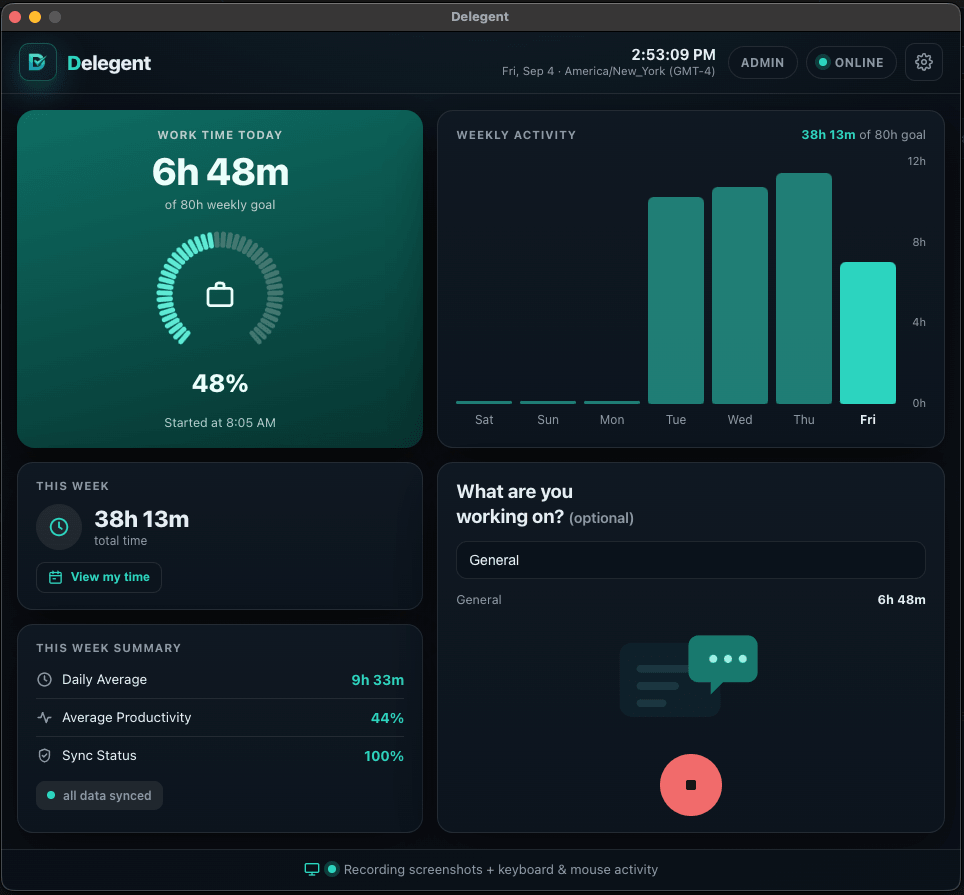
The same honest numbers, for both sides
Fair to both sides. Your team sees exactly what gets tracked and when it’s on. The same honest record for the business and the worker, no surprises.
Every hour, backed up. Screenshots and activity stand behind the numbers, so you pay for real work and your team gets the credit they earned.
Flags what needs a closer look. Long stretches of mouse movement with no keyboard input, and keys held down for a minute or more, get flagged for review, so a few bad habits never put the whole team under suspicion.
Your team stays in control. Remote workers install it themselves, can stop tracking at any time, and can blur or delete their own screenshots.
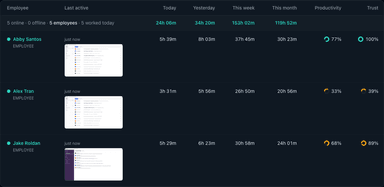
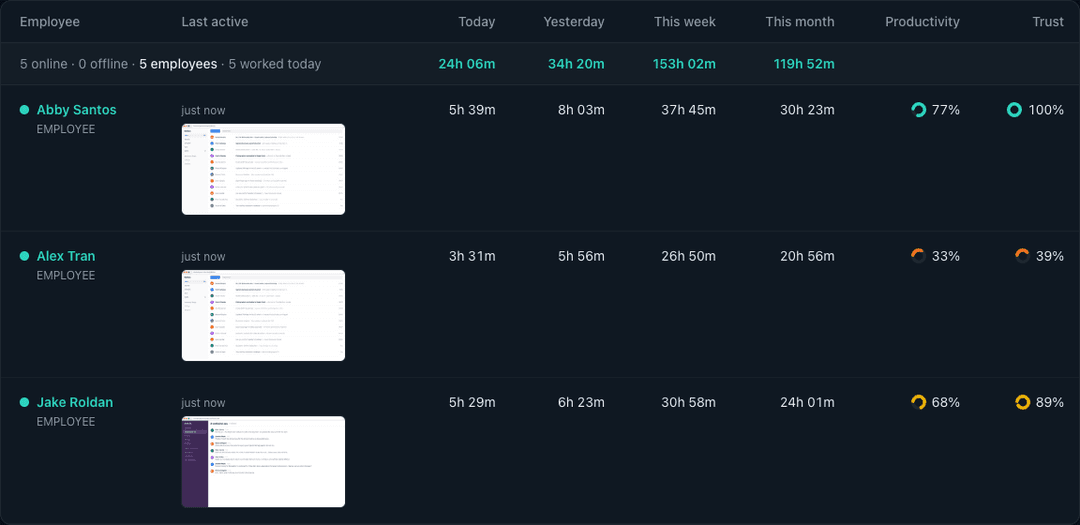
Every hour your team works, in one table
Today, yesterday, this week and this month for everyone at once, with the last screen they were on, so you can see the work behind the number without asking anyone for an update.
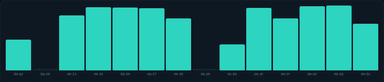
A day, hour by hour
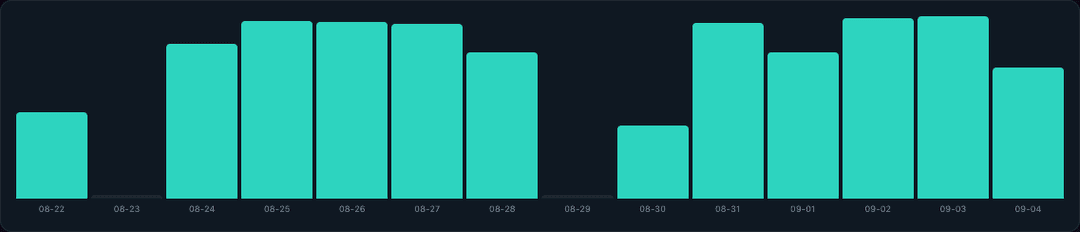
Open anyone’s day and see exactly when the work happened, which projects it went to, and which days of the month were tracked at all.


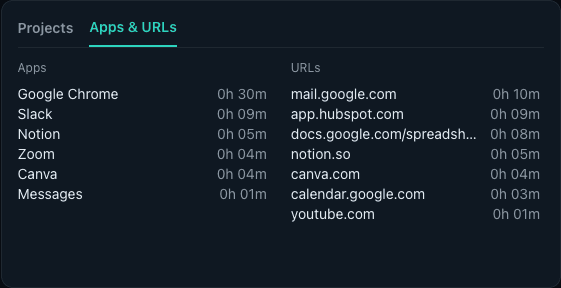
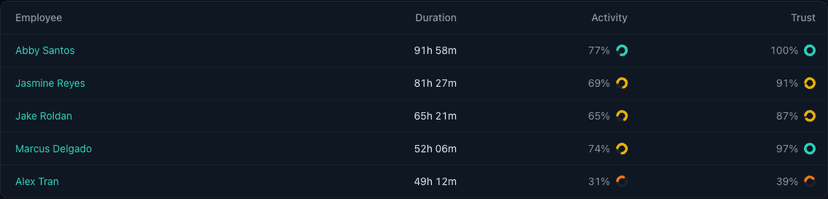
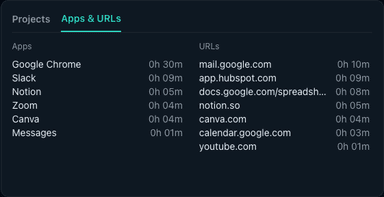
The apps and sites behind the hours
Where tracked time actually went, per person per day, so a quiet afternoon and a busy one can be told apart by something better than a hunch.
Blur it or delete it: the employee decides
Anyone can hide or remove a screenshot of their own. A hidden capture is never served, not even to an admin, and the deducted minutes come off the day’s total automatically.
Reports you can hand to a client
Any date range, every employee, exported to CSV or PDF, or emailed to you weekly without logging in at all.
What Delegent never does
Tracking software earns trust by what it refuses to do. These limits are built into the app. They are not settings an admin can switch on.
Record what anyone types
It counts key presses and mouse movement to measure activity. The keys themselves are never recorded or sent.
Run hidden
Each person installs it and signs in themselves. It sits in the menu bar or system tray, and a notification appears every time a screenshot is taken.
Turn on a camera or microphone
The app has no access to either. There is nothing to switch on.
Track outside work time
It records only between Start and Stop, and pauses on its own when the computer sleeps, the lid closes or the screen locks.
Open email, chats or files
Nothing is opened or read. A screenshot shows only what was on the screen at that moment.
Simple pricing. Per user. No surprises.
Start free. Upgrade when your team grows. Switch plans any time.
per month
- Time Tracking
- Screenshot Monitoring
- Up to 30 screenshots per hour
- Screenshot history
- Individual Settings
- Activity Level Tracking
- Trust Score
- App & URL tracking
per month
- Time Tracking
- Screenshot Monitoring
- Up to 6 screenshots per hour
- Screenshot history
- Individual Settings
- Activity Level Tracking
- Trust Score
- App & URL tracking
3 users
- Time Tracking
- Screenshot Monitoring
- 3 screenshots per hour
- Screenshot history
- Individual Settings
- Activity Level Tracking
- Trust Score
- App & URL tracking
Switch to Free plan any time. No credit card required.
Do employees know Delegent is running?
Yes. Each person installs the desktop app on their own computer and signs in themselves. While it tracks, it shows in the menu bar or system tray, and a notification appears every time a screenshot is taken.
What does Delegent record?
Only while tracking is on: the hours worked, screenshots at random moments, keyboard and mouse activity levels (how active, never what was typed), and the app and website in use. Which of these your dashboard shows depends on your plan.
Can employees hide a screenshot?
Yes. Anyone can blur or delete a screenshot of their own. A blurred screenshot is not shown in the dashboard to anyone, admins included, and the time from a deleted one comes off that day’s total.
Does it keep tracking when someone steps away?
No. Tracking pauses by itself when the computer sleeps, the lid closes or the screen locks. It also pauses after a stretch with no keyboard or mouse input: 60 minutes, unless an admin sets a different time or turns that pause off.
Which computers does it run on?
Mac (Apple Silicon and Intel) and Windows.
What does the free plan include?
Up to 3 users, time tracking, 3 screenshots per hour and screenshot history. No credit card required. Upgrade to Standard or Professional when you need more.
Can I cancel at any time?
Yes. Switch to the Free plan whenever you like, and your paid plan stays active until the end of the period you have already paid for. If you ask within 14 days of your first payment, we refund it in full.
Start free for up to 3 users
Time tracking, screenshots and activity levels your whole team can see. Install it on Mac or Windows, press Start, and you are tracking in a few minutes.
Create your free account
Free for up to 3 users. No credit card required.